
Elevating Perlin Noise: Creative Tips for Dynamic Visuals

If you're tired of generating the same old Perlin noise patterns, this article is for you. I’ll share a few simple techniques to transform mundane noise into something truly captivating.
Standard 2D noise often yields predictable results—like this basic field:

Or this "hairy" pattern that many creative coders run into:

I’m going to show you how to push these parameters further to create textures like these—from brindled fields to rhythmic ripples:


With these tips, even that "hairy mess" can be turned into something artistic!

This article assumes you have some experience with thenoise()function in Processing or p5.js. If you're new to noise, I recommend starting with this series:
📘 Come on! Feel the noise! Part 1
📘 Come on! Feel the noise! Part 2
The Standard Approach
First, let’s look at a typical way to apply noise to color using HSB mode.
HSB is ideal for creative coding because it allows for intuitive control over hue, saturation, and brightness.
colorMode(HSB, 360, 100, 100, 100);
let pHue = initHue + noise(n02) * hueStep;
let pSat = noise(10, n01, n02) * 100;
let pBri = noise(20, n01, n02) * 100;
fill(pHue % 360, pSat, pBri, 100);
In the basic example below, we map noise values directly to HSB parameters:
const w = 570;
const h = 360;
const wDiv = 285;
const hDiv = 180;
const nStep = 0.005;

function setup() {
  createCanvas(w, h);
  colorMode(HSB, 360, 100, 100, 100);
  noLoop();
}

function draw() {

  let cellW = w / wDiv;
  let cellH = h / hDiv;
  let baseHue = random(360);

  background(0, 0, 0, 100);
  noStroke();

  for (let x = 0; x < w; x += cellW) {
    let nX = x * nStep;
    for (let y = 0; y < h; y += cellH) {
      let nY = y * nStep;

      let nValH = noise(10, nX, nY);
      let nValS = noise(20, nX, nY);
      let nValB = noise(30, nX, nY);
      let nHue = (baseHue + nValH * 240) % 360;
      let nSat = 30 + 60 * nValS;
      let nBri = 20 + 80 * nValB;

      fill(nHue, nSat, nBri, 100);
      rect(x, y, cellW, cellH);
    }
  }

}

function mouseClicked() {
  let dt = new Date();
  noiseSeed(dt.getTime());
  redraw();
}

You can adjust the "smoothness" by changing the nStep value. A smaller step creates a more gradual transition, while a larger step results in a more granular texture.
const nStep = 0.002;

const nStep = 0.008;

I'll show you the tips with this code as the base.
Tip 1: Nesting Noise (Domain Warping)
We start with a standard 2D noise implementation:
let nValH = noise(10, nX, nY);
let nValS = noise(20, nX, nY);
let nValB = noise(30, nX, nY);
Note: I used constants like 10, 20, and 30 as offsets to generate distinct noise sets. While it might look like 3D noise, it is effectively 2D noise with different seeds.
Instead of passing static coordinates to your noise function, try nesting them. This adds a second layer of distortion, often called "nested noise."
I put one more parameter 'nP' and calculate 'nP' with 'noise()'.
let nP = noise(nX, nY);
let nValH = noise(10 + nP, nX, nY);
let nValS = noise(30 + nP, nX, nY);
let nValB = noise(40 + nP, nX, nY);

The result is much more organic and unpredictable.
let nP = noise(nX, nY) * 5;

Starting to look interesting, right?
This technique is a simplified version of "Domain Warping," a powerful method for creating complex textures.
Tip 2: Mathematical Ingenuity
You don't have to use nX and nY linearly. By altering the input calculation, you can force the noise to follow specific geometric structures.
Diagonal Bias:
let nP = noise(nX + nY) * 5;

Radial/Curved Structures:
let nP = noise(nX * nY) * 5;

let nP = noise(nX * nX + nY * nY) * 5;

Going Further with Trigonometry
Integrating sin() or cos() into your noise parameters can create mesmerizing, wave-like interference patterns.
let nP = (cos(nX * 2) + sin(nY)) * 5;

let nP = cos(nX * sin(nY * 2.0)) * 3;

Shaping Noise with Distance Functions
By calculating the distance (dist()) from the center or a specific point, you can constrain your noise to follow circular or swirling paths.
let nP = sin(dist(x, y, w * 0.5, h * 0.5) / w * HALF_PI) * 5;

let d = dist(x, y, w * 0.5, h * 0.5);
let dx = cos(PI * d / w) * w;
let dy = sin(PI * d / h) * h;
let nP = dist(x, y, dx, dy) * nStep * 5;

let dx = x;
let dy = (sin(x / w * PI * 3) * 0.2 * x / w + 0.5) * h;
let nP = dist(x, y, dx, dy) * nStep * 3;
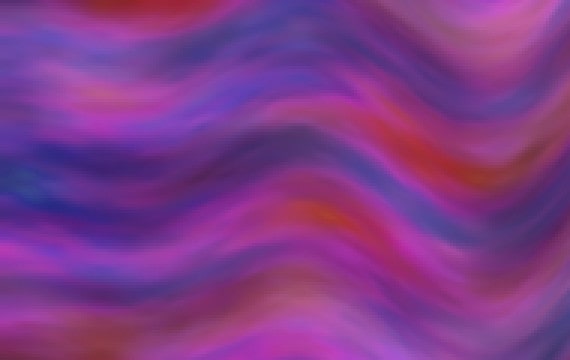
let dx = constrain(x, 0, w * 0.7);
let dy = (sin(x / w * PI * 5) * 0.2 * (1 - x / w) + 0.5) * h;
let nP = dist(x, y, dx, dy) * nStep * 3;
Conclusion: Experiment and Explore
As you can see, the secret to mastering Perlin noise lies in how you manipulate its input parameters. By combining trigonometric functions, distance calculations, and nested noise, the possibilities are endless.
I’d love to see what you create using these techniques. Happy coding!

deconbatch
To make something is my pleasure. Having fun in endless trial-and-error. Now, I'm loving creative coding and showing some example code in my blog. Mainly creating Processing code examples.



My man, you are awesome!
Thank you so much! 😀
Remember how you did the first picture?
I think it may be similar to the last code example in this article.
[ Come on! Feel the noise! Part 1 ]
https://www.deconbatch.com/2020/11/come-on-feel-noise-part-1.html
Enjoy! 👍