When p5.js createGraphics() Refuses to Let Go of Your Memory

Just like a cat with its favorite toy, createGraphics() can be surprisingly stubborn—it won't let go of your memory even after you're done with it. Here is how to pry it loose.
The Claws of a Memory Leak
I learned about this "grip" from a tweet by Tetsunori NAKAYAMA (@tetunori_lego), who pointed out that failing to remove unused graphics objects leads to massive memory leaks.
#p5js のcreateGraphics常用する中で、すぐメモリ枯渇したりGC?走っているのか黒画になって描画失敗するの解析していたんだけど、原因は使い終わったgfxをremoveしてない件だったよう。例えば、添付のコードで盛大にリークしているみたい。PC落ちたりもしたので再現実験は注意。 pic.twitter.com/xcSc4VKVaM
— Tetsunori NAKAYAMA | 中山 哲法 (@tetunori_lego) December 4, 2021
This appears to be the same issue reported on GitHub:
createGraphics() stays in memory, 1GB+ RAM after a while #1785
The solution is simple yet vital: Always call remove() on your p5.Graphics objects as soon as they are no longer needed.
const pg = createGraphics(w, h);
pg.colorMode(RGB, 255);
pg.clear();
 .
 .
 .
image(pg, 0, 0);
pg.remove();
reference | remove() - P5.js
I fixed this problem on the JavaScript module 'Garg' that uses many createGraphics(). I hope it will be nice concrete example how to solve the problem.
* Garg is the JavaScript module that generates a resembling Generativemasks.
Taming the 'Garg' Memory Eater
Tetsunori-san was kind enough to find this exact issue in my 'Garg' module and even sent me a patch. Before the fix, my browser would crash instantly whenever I tried to generate large masks repeatedly.
function setup() {
    createCanvas(5000, 5000);
}

function draw() {
    clear();
    gg = new Garg(false, true, false);
    image(gg.createMask(0, 5000), 0, 0);
}
I applied the patch from Mr. Nakayama, then my browser stayed stable and purred along just fine.
It's not the Problem Only in the 'Garg'
To begin with, the 'Garg' returns the p5.Graphics that is created with createGraphics(). So fixing the code inside of the 'Garg' can't solve the whole problem.
If you write a code like this, the code will not let your memory go.
image(gg.createMask(id, size), 0, 0);
To fix the problem, you can remove() the p5.Graphics like this.
let mask = gg.createMask(id, size);
image(mask, 0, 0);
mask.remove();
That is, you should use upgraded 'Garg' and write a code correctly to remove() the p5.Graphics that are returned from the 'Garg'.
Upgraded Garg 0.1a
I upgraded the 'Garg' from version 0.1 to 0.1a. 'a' stands the Mr. nAkAyAmA's 'a'!
Upgraded Garg 0.1a is here. There is also 'diff' for the people who made a derivative of the 'Garg'.
Create a JavaScript module that generates a resembling Generativemasks.
A Browser-Specific Mystery?
Interestingly, even with the fix, I found that Firefox 94.0 (64-bit) still struggles, sometimes crashing under heavy load. However, Google Chrome 96.0.4664.93 64bit handles the memory release perfectly. It seems memory management can still vary between browser engines.
Demonstration of the Death: A Stress Test
I made a demonstration program on OpenProcessing to compare the fixed and not fixed versions of the 'Garg'. If you want your browser down, try it with your own risk.
* Note: Firefox may still crash even with the fixed version.
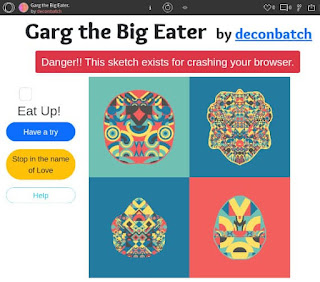
It will be fun to try it with the memory usage measuring tool (ex. Task manager on Windows).
Don't Let Your RAM Become a Scratching Post
Memory leaks are silent application killers. To keep your creative coding projects stable, make it a habit to properly remove() any offscreen graphics—especially large ones. Your users (and their RAM) will thank you.

deconbatch
To make something is my pleasure. Having fun in endless trial-and-error. Now, I'm loving creative coding and showing some example code in my blog. Mainly creating Processing code examples.